


You no longer need a fax machine for faxing. You can start receiving and sending faxes securely with WiseFax, an online fax service, instantly. WiseFax also allows its subscribers to customize the fax header for outgoing faxes.
How to customize a fax header?
- Sign in to WiseFax with your existing account
- If you do not have a subscription, get a fax number first.
- Find the “Custom fax header title” option.
- Check the “Use custom title in fax header” option and write your fax header.
- Save Preferences.
The custom title will be appended to the fax number in the header of all faxes that you send from your fax number.
How does a subscription work?
You can get your own US or Canada based fax number for the fixed monthly cost of $8.00 (or for the fixed weekly cost of $4.25). A subscription to the fax online service includes one fax number, on which you can receive up to 300 pages per month (or 50 per week), and an additional 10 fax tokens each month (or 5 fax tokens each week) that you can use for sending faxes. There are no start-up or cancellation fees. Customizing the fax header for outgoing faxes is also possible when you have an active subscription.
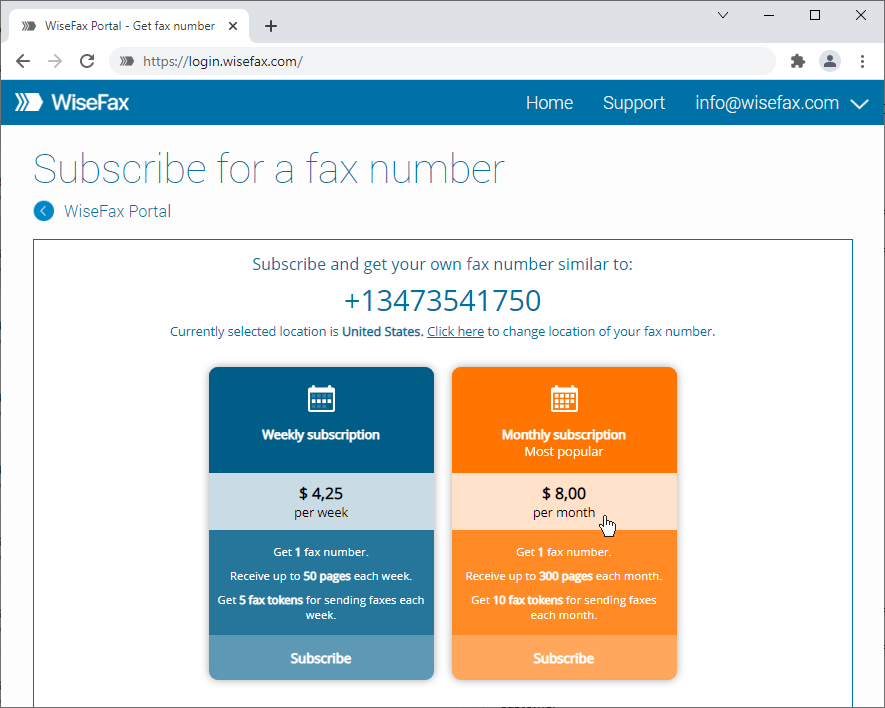
You can get your fax number immediately after registering or signing in on the WiseFax Account website by choosing the option “Get fax number” and making a payment. Your new fax number will be activated as soon as the order is completed, and you will be immediately ready to receive faxes with WiseFax fax number.
If you already have an active subscription for your fax number, then you’ll find an option “Your fax number” at WiseFax Account website, where you can monitor your subscription status. The subscription renews automatically at the end of each subscription period, which also preserves your current fax number. If you no longer want to receive faxes with your WiseFax fax number, you can cancel your subscription at any time, without any cancellation fees.
More resources
Get your own fax number now
Send a fax with WiseFax
How to fax a PDF document?
Now you know how easy customizing a fax header with WiseFax is.