


Voting from another country can be straightforward when you know which forms to complete and how to return them. However, an overseas vote may involve registration paperwork, ballot requests, signatures, identification details, and strict election deadlines. In some elections and jurisdictions, eligible military and overseas voters may be permitted to return certain documents by fax.
An online fax service such as WiseFax can help transmit an approved election document without requiring a physical fax machine, a landline, or a visit to a business center. You can prepare and send documents using a computer, tablet, or smartphone.
The most important rule is simple: check the current instructions from your election authority before sending anything. Fax is not an approved return method for every election, voter, form, or location. An online fax service can transmit a document, but it cannot determine whether your ballot materials are legally valid or officially received.

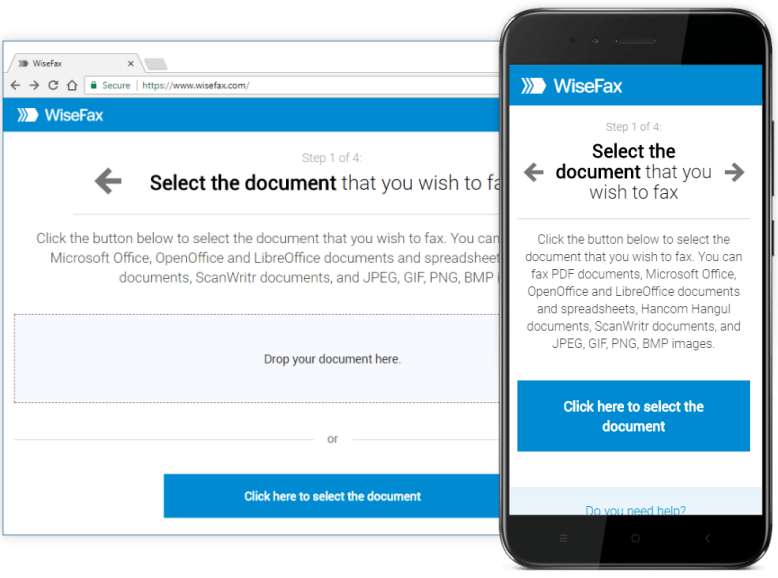
Why online faxing can be useful for overseas voters
People living abroad may have dependable internet access but limited access to fax equipment. Finding a public fax machine can be difficult when you are traveling, stationed overseas, working remotely, or living in an area without convenient office services.
Online faxing can make the document-return process more convenient by allowing you to:
- Send an election form from a browser or mobile device
- Avoid purchasing or maintaining a fax machine
- Upload a PDF, scan, or supported image file
- Add text or a signature before transmission when appropriate
- Keep a copy of the final document
- Monitor the fax status and retain a transmission report
These features can reduce logistical challenges, but they do not replace official voting guidance. Use them only after confirming that fax is an authorized option for your specific overseas vote.
How to send an overseas vote document online
Once the election office confirms that fax is allowed, the following workflow can help you prepare and transmit your document.
Get the official instructions
Download the current registration form, ballot request, voted ballot, or other required document from an official election source. Read every instruction carefully, including rules about signatures, dates, attachments, and return methods.
Check the deadline in the election authority’s stated time zone. If possible, send your materials well before the deadline so there is time to correct a failed transmission or contact the election office.
Confirm the destination fax number
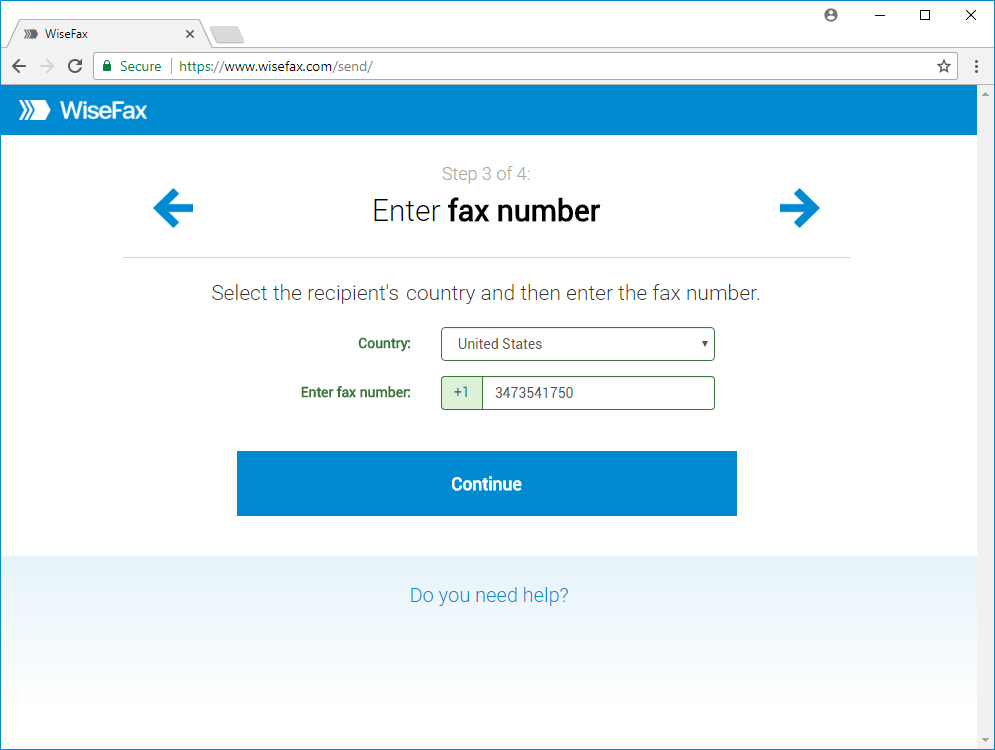
Use the fax number supplied by the relevant election office. Do not rely on an old number found in an email, forum post, or search result unless the official authority confirms that it is current.
Also ask whether the office requires a cover page, an attention line, a voter identification number, or any special labeling. Incorrect routing can delay processing even when a fax appears to transmit successfully.
Complete and review the document
Fill out the form exactly as instructed. Before uploading it, check that:
- Your name and identifying information are accurate
- Every required field is complete
- All required signatures are present
- Dates use the requested format
- Checkboxes and selections are clear
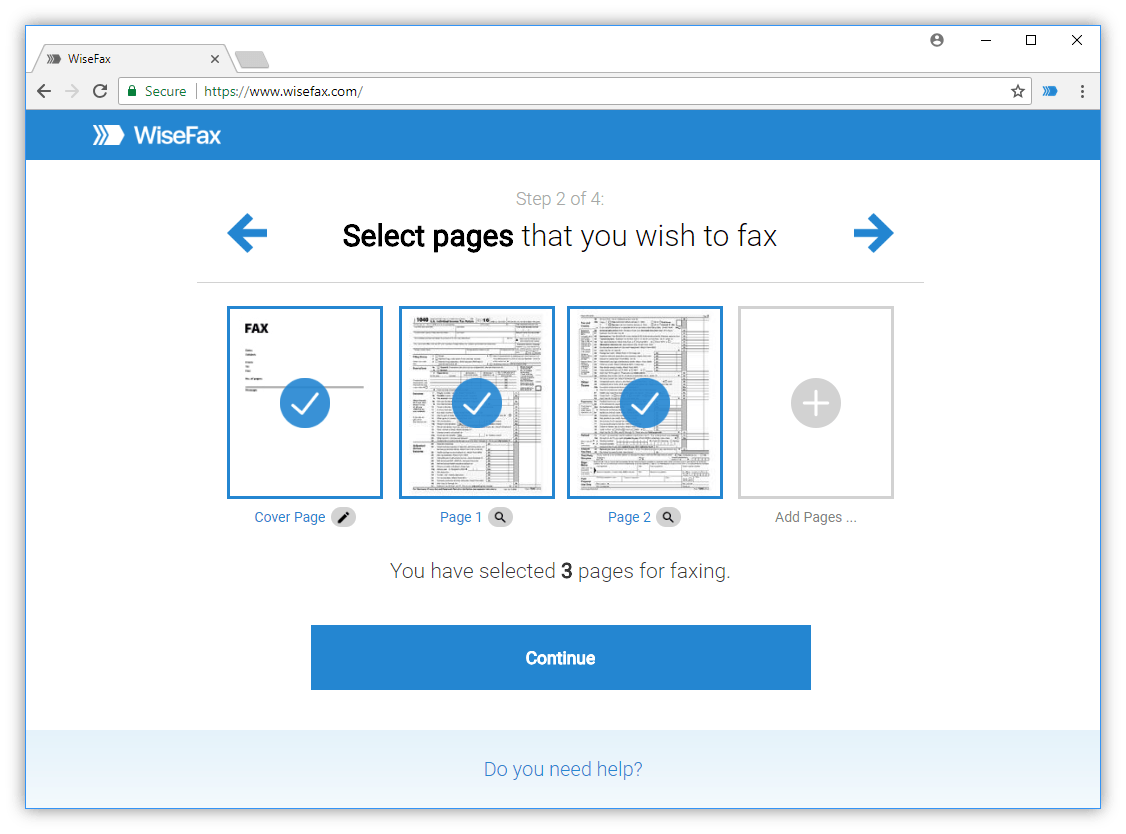
- Every page is included and in the correct order
- The scan or photograph is readable
If the form contains sensitive personal information, use a trusted device and connection. Keep the original file in a secure location.
Upload the file to the online fax service
Upload the completed document through the service’s web or mobile workflow. Commonly supported formats may include PDF, Microsoft Office and Apple iWork files, and image formats such as JPEG, PNG, or TIFF. Accepted formats and page limits can vary, so check the service before sending.
If you photographed the document, make sure the entire page is visible. Avoid glare, shadows, cropped edges, and low-resolution images that could make important information difficult to read.
Make only appropriate edits
WiseFax tools let you add text, insert a signature, rotate pages, or crop excess background. These features may help you complete a form without printing and rescanning it.
Use editing tools carefully. Do not alter election instructions, obscure information, remove required content, or make changes that could affect the meaning of your document. Review the final version at full size before confirming transmission.
Send and save the confirmation
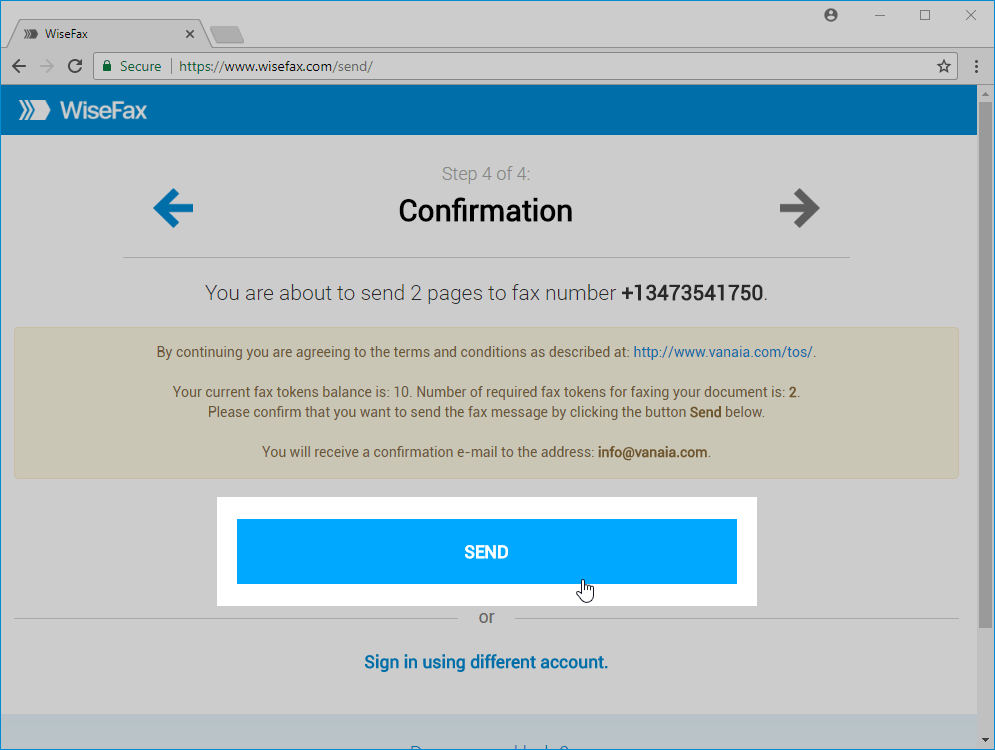
Enter the official destination number, review the page count, and confirm the transmission. Keep the service’s confirmation report or delivery notification, along with a copy of the exact document you sent.
A delivery report can show that the fax reached the destination number, but it is not necessarily proof that an election office reviewed or accepted the document. Follow the election authority’s instructions for confirming receipt.
Improve the clarity of scanned pages
A photographed or scanned form may contain shadows, stains, uneven margins, or background distortion. WiseFax’s image enhancement can reduce distortion and improve document appearance. Its edge-detection function can help identify page boundaries, while cropping removes excess space outside the document.
Those improvements may make a fax easier to read and can reduce unnecessary image content. However, editing should never obscure a required field or alter information. Review the enhanced page at full size before transmission. If the document contains sensitive information, ensure that any attempted redaction is complete and appropriate for the recipient’s instructions.
Edit and complete forms before sending an overseas vote
WiseFax includes tools that can help users prepare a document before transmission. You can insert text into a form, rotate a page, add a cover page, and place a signature. You can also use pen marks to add ticks, circles, or underlines and use a marker to highlight a section. Users can save up to three signatures for later insertion.
These tools can reduce the paper loop associated with faxing. Instead of printing a form, writing on it, signing it, scanning it, and uploading it, a user may complete several steps digitally. Therefore, the process can be more practical for someone living overseas or working from a temporary location.
Before sending, inspect every page. Confirm that names, identification details, dates, signatures, checkboxes, and election-office information are legible and complete.
Sending an overseas vote from a phone, tablet, or computer
An overseas voter may not have access to the same device used to download or complete a form. A browser-based fax workflow can help you work from a computer, smartphone, or tablet, depending on the document and connection available.
For example, you might download an official PDF on a laptop, sign it using the permitted method, and upload it from that device. Alternatively, you may scan a completed page with a phone and send the resulting file through a secure browser session.
Before sending from a mobile device:
- Connect to a trusted network.
- Check that the document is the final version.
- Confirm that no pages are missing or rotated incorrectly.
- Review the destination number character by character.
- Store the confirmation report securely after transmission.
Convenience should not come at the expense of privacy or accuracy, especially when documents contain personal or voter-identification information.
Keep a record of the transmission
Meeting an election deadline involves more than pressing Send. WiseFax allows fax-status tracking, email notifications, automatic retries, and automated rerouting for outbound faxes. These features are intended to help users monitor the transmission process if the first attempt does not complete.
The WiseFax portal also provides confirmation reports. A report can include delivery status and a complete copy of the fax, which users can print or retain for their records. This creates a useful record of what was transmitted and when.
Still, a fax report is not the same as official receipt or acceptance. After sending election materials, follow the relevant election office’s instructions for checking receipt. If the office provides a confirmation method, use it rather than assuming that a successful transmission guarantees that the document will be accepted or counted.
Sending versus receiving election documents
WiseFax supports two different needs. Pay-as-you-go sending is intended for users who need to transmit a document occasionally. A separate fax-number subscription is available for users who need to receive incoming faxes. The site currently presents monthly and weekly plans, although pricing, allowances, and availability can change.
A dedicated number may help a voter or family member receive documents from an organization, agency, or election office. Received faxes are stored in WiseFax’s portal and users receive email notifications. Before relying on incoming faxing, confirm that the sender has the correct number and that the recipient is authorized to receive the document.
A careful overseas vote checklist
Before using an online fax service for an election-related document, confirm the following points:
- Check whether fax is an approved return method for your election and voter category.
- Obtain the correct fax number and current instructions directly from the election authority.
- Verify the deadline, time zone, signature rules, cover-sheet requirements, and any authentication steps.
- Prepare the document and review every page for completeness and legibility.
- Retain the original, the final transmitted copy, and the WiseFax confirmation report.
- Contact the election office to verify receipt when its instructions recommend doing so.
This checklist does not replace official guidance or legal advice. It simply helps reduce avoidable mistakes in a time-sensitive process.
A secure and careful approach to an overseas vote
For eligible voters who can return election materials by fax, WiseFax can reduce the practical barriers associated with overseas voting. Its browser and mobile access eliminate the need for a physical fax machine. Pay-as-you-go sending can suit one-time or occasional needs, while document editing, image enhancement, signatures, delivery tracking, and confirmation reports support a more complete workflow.
Most importantly, users should treat WiseFax as a document-transmission service. Election rules remain controlled by the appropriate election authority, and those rules can change. Check official instructions first, prepare the document carefully, send it before the stated deadline, and verify receipt whenever possible.